Showing posts with label R12 Application. Show all posts

Monday, 3 February 2014

Changing the APPS password in 11i

Steps to change apps password 

1. Backup entire system
2. Stop concurrent manager
  cd $COMMON_TOP/admin/scripts/$CONTEXT_NAME
  adcmctl.sh stop apps/<apps password>
3. Backup FND_ORACLE_USERID table
  sqlplus apps/<apps password>
  drop table FND_ORACLE_USERID_BAK; (if there is any table like this)
  create table FND_ORACLE_USERID_BAK as select * from FND_ORACLE_USERID; 
  exit;
4. Change apps password
  $FND_TOP/bin/FNDCPASS apps/<old apps password> 0 Y system/<system password> SYSTEM APPLSYS <new apps password>
5. Change apps password in configuration files
  $IAS_ORACLE_HOME/Apache/modplsql/cfg/wdbsvr.app
  $IAS_ORACLE_HOME/listener/cfg/wdbsvr.app
  $ORACLE_HOME/listener/cfg/wdbsvr.app
  $FND_TOP/resource/wfmail.cfg
  $OA_HTML/bin/appsweb.cfg
  $AD_TOP/admin/template/CGIcmd.dat

Known Issues 

1. Symptom : Can not login to Oracle Applications
  Cause   : Invalid apps password in $IAS_HOME/Apache/modplsql/cfg/wdbsvr.app

  Solution: Change apps password in $IAS_HOME/Apache/modplsql/cfg/wdbsvr.app

Friday, 15 November 2013

How to restart the failed adpatch session

So many times adpatch session get failed because of prerequisit patch, some prerequisit steps which you forget to follow and some time it get failed because invalid objects etc.So from the below given steps you can secure the adpatch session and can restart from where it get failed.

1.  Backup the FND_INSTALL_PROCESSES table which is owned by the APPLSYS schema
$ sqlplus applsys/<password>
SQL> create table fnd_Install_processes_back as select * from fnd_Install_processes;
--The 2 tables should have the same number of records.
select count(*) from fnd_Install_processes_back;
select count(*) from fnd_Install_processes;

2.  Backup the AD_DEFERRED_JOBS table.
create table AD_DEFERRED_JOBS_back as select * from AD_DEFERRED_JOBS;
--The 2 tables should have the same number of records.
select count(*) from AD_DEFERRED_JOBS_backup;
select count(*) from AD_DEFERRED_JOBS;

3.  Backup the .rf9 files located in $APPL_TOP/admin/<SID>/restart directory.
At this point, the adpatch session should have ended and the cursor should be back at the Unix prompt.
$ cd $APPL_TOP/admin/<SID>
$ mv restart restart_backup
$ mkdir restart

4.  Drop the FND_INSTALL_PROCESSES table and the AD_DEFFERED_JOBS table.
$ sqlplus applsys/<password>
SQL> drop table FND_INSTALL_PROCESSES;
SQL> drop table AD_DEFERRED_JOBS;

5.  Apply the prerequisite patch. or complete the prerequisite steps.

6.  Restore the .rf9 files located in $APPL_TOP/admin/<SID>/restart_backup directory.
$ cd $APPL_TOP/admin/<SID>
$ mv restart restart_<patchnumber>
$ mv restart_backup restart

7. Restore the FND_INSTALL_PROCESSES table which is owned by the APPLSYS schema.
$ sqlplus applsys/<password>
SQL> create table fnd_Install_processes as select * from fnd_Install_processes_backup;
--The 2 tables should have the same number of records.
SQL> select count(*) from fnd_Install_processes;
SQL> select count(*) from fnd_Install_processes_backup;

8. Restore the AD_DEFERRED_JOBS table.
$ sqlplus applsys/<password>
SQL> create table AD_DEFERRED_JOBS as select * from AD_DEFERRED_JOBS_backup;
--The 2 tables should have the same number of records.
SQL> select count(*) from AD_DEFERRED_JOBS_backup;
SQL> select count(*) from AD_DEFERRED_JOBS;

9. Re-create synonyms
$ sqlplus apps/apps
SQL> create synonym AD_DEFERRED_JOBS for APPLSYS.AD_DEFERRED_JOBS;
SQL> create synonym FND_INSTALL_PROCESSES FOR APPLSYS.FND_INSTALL_PROCESSES;

10. Start adpatch, it will resume where it stopped previously.

How to apply patch in Oracle Applications

Patching is the most basic thing that an Oracle Apps DBA is expected to know.A patch is applied either to fix a bug or to add some new functionality.

Here are the steps for patching in Apps 11i:

1. First check that the patch is already applied or not.
select * from ad_bugs where bug_number='patchnumber';


Now if the patch is not applied then go through the read me of the patch on Metalink. Check for pre-reqs and download the patch.

2. Download the patch from http://support.oracle.com for e.g : 9936620
3. Transfer the patch on the server using FTP software.
4. Unzip the patch on the server.
5. Source the Application environment file (APPS<SID>_HOSTNAME.env).
6. Stop the apps services
./adstpall.sh apps/password
7. Bounce the database(This is not mandatory but it kills any hanging process)
./addbctl.sh stop immediate
./addlnctl.sh stop listnername
./addlnctl.sh start listnername
./addbctl.sh start
6. Put the system in Maintenance mode
Run adadmin--Goto step 5-Change Maintenance mode-step 1 Enable Maintenance mode

Note: If you do want to stop all application services and put application in maintenance mode, You can apply patch by using hotpatch option.
e.g: adpatch options=hotpatch

7. Goto the patch directory where you downloaded the patch.Unzip the patch as applmgr user(application owner).It will create a directory with the patch number.
8. Goto the directory with the patch number and run
$ adpatch
It will ask for patch log file,apps,system password,driver name(c,d,g,u),number of workers.

Note: If you have multi-node environment, then start applying patch from concurrent processing node.

9. Go through the patch log file and check that there is no error
10. Disable maintenance mode
Run adadmin--Goto step 5-Change Maintenance mode-step 2 Dis-able Maintenance mode
11. Bounce the database again
12. Start the apps services
./adstartal.sh apps/password


Thursday, 14 November 2013

AD PATCH

When a customer reports a problem or SR (Service Request) a support analyst investigates the problem. If a patch doesn't exist to fix the problem, the problem is logged as a bug. Development researches the bug and creates a patch.

Patches in Oracle Applications are applied using the adpatch utility, this is referred to as AutoPatch. AutoPatch is also used to apply release updates. Release updates are large patches that fix bugs for all products. Release updates may also add new functionality and the release number is incremented (i.e., 11.5.9 - >11.5.10). The adpatch utility executes the *.drv files in order to apply the patch.

server patches may have three types of driver files: Copy, Database, and Generation. The Copy driver copies replacement files and links executables. The Database driver updates the database with SQL scripts and otherprograms. The Generate driver generates forms, reports, and message files. This is also the order that driver files should be applied: Copy, Database, Generation. Other components of a patch may include: Readme.txt, replacement files, SQL scripts or binary executables. Always read the Readme.txt file. Some patches may include a special version of the admin utilities, such as, adpatch or adadmin.A fourth type of driver file is now available with 11i. This driver simplifies copying Java classes and updates java files. The format is j.zip (Release 11i).

The readme file for a patch should include a description of the problem being fixed and how to apply the patch. The readme may require the use of included admin utilities (usually adpatch). The patch driver file includes a list of files that have been altered and a list of patches included in the patch set.

Types of application patches
• Stand-alone (one-off) Patch: Addresses a single fix or enhancement. Stand-alone patches are released only when there is an immediate need for a fix or enhancement that cannot wait until an aggregate bundling is available. Although stand-alone patches are intended to be as small as possible, they usually include any dependent files that have changed since the base release in order to form a complete patch that can be applied by any customer. The actual number of files changed will depend on the current code level on the system to which the patch is being applied.

• Rollup Patch (RUP): An aggregation of patches that may be at the functional level, or at a specific product/family release level. For example, a Flexfields rollup patch contains all the latest patches related to Flexfields at the time the patch was created. A Marketing Family 11.5.9 rollup patch contains all the latest Marketing patches released since, and applicable to, 11.5.9.

• Mini-pack: An aggregation of patches at the product level. For example, Inventory Mini-pack G (11i.INV.G) contains all the latest patches for the Inventory product at the time the mini-pack was created.Mini-packs are cumulative.

• Family Pack: An aggregation of patches at the product family level. For example, HR Family Pack C (11i.HR_PF.C) contains all the latest patches for products in the HR family at the time the family pack was created. Family packs are cumulative.

• Maintenance Pack: An aggregation of patches for all products in the E-Business Suite. For example, Release 11.5.10 Maintenance Pack contains all the latest code level for all products at the time 11.5.10 was created. Maintenance packs are numbered sequentially such as 11.5.8, 11.5.9, 11.5.10, and are cumulative.

Patches can also be organized by purpose.

• Diagnostic Patch: Used to gather additional information when a product failure cannot be reproduced by Oracle. The additional information will assist Oracle Support Services and Oracle Development in resolving the failure.• Interoperability Patch: Allows Oracle Applications to function properly with a newer version of the technology stack. Interoperability patches are typically required with new version of the database or Applications technology stack.

• Translated Patch: A non-English version of a patch. Release 11i supports 30 non-English languages. Customers who are using languages other than English, need to apply the corresponding translated patch(es) for the languages they are using in addition to any base US patch(es).

• Merged Translation Patch: Provided in real time (without requiring a translator) in the event a translated patch is not available when a customer needs it. A merged translation patch is applied just like a fully translated patch. The fully translated patch is escalated and is usually available within 24 hours. It can be applied safely on top of a merged translation patch.

• Translation Fix: Provided in the event a translation word choice is inappropriate. A translation fix is applied just like a translated patch, except there is no corresponding base US patch.

• New Feature Patch: Introduces new functionality and/or products. It is applied using standard patching utilities.


Sequence of activities performed by adpatch : 


C Portion
=> Parse & Load the specified patch driver file
=> Check for patch integrity
=> Apply new applprod.txt if any
=> Perform version checking for the patch driver files
=> Copy driver files into installation area
=> Forecopy driver files into installation area (if any)
=> Screen out files that are not valid
=> Determine valid on-site files
=> Check if object modules exist to copy
=> Extract object modules from product libraries
=> Perform Version checking
=> Check if will copy object modules
=> Determine directories to create (if any)
=> Determine what executables to link
=> Determine forms to generate
=> Determine Oracle Report libraries to generate
=> Determine Oracle Reports to generate
=> Copy files into installation area
=> Archive object modules in the product libraries
=> Create directories
=> Relink executables
=> Perform second half of mirrored copies
=> Update Oracle Applications java Files

D -Portion
=> Run SQL and EXEC scripts

G-Portion
=> Generate Forms library files
=> Generate Forms Menu files
=> Generate Forms executables
=> Generate Report libraries
=> Generate Reports
=> Generate Graphics libraries
=> Generate Graphics
=> Generate Messages
=> Generate Workflow resource files
=> Update Patch History database
=> Copy applprod.tmp to applprod.txt (if needed)


General sequence of steps for worker processing 


This is the sequence of steps that happen which is not visible in the front screen


Running SQL and EXEC commands in parallel...

1. CREATE TABLE fnd_install_processes
2. CREATE UNIQUE INDEX fnd_install_processes_u1 on fnd_install_processes
3. GRANT ALL ON fnd_install_processes TO APPS WITH GRANT OPTION
4. CREATE SYNONYM fnd_install_processes FOR APPLSYS.fnd_install_processes
5. CREATE TABLE AD_DEFERRED_JOBS(
6. CREATE UNIQUE INDEX AD_DEFERRED_JOBS_U1 on AD_DEFERRED_JOBS
7. GRANT ALL ON AD_DEFERRED_JOBS TO APPS WITH GRANT OPTION
8. CREATE SYNONYM AD_DEFERRED_JOBS FOR APPLSYS.AD_DEFERRED_JOBS
9. INSERT INTO fnd_install_processes (number of times depending on the no. of workers)*.

Reading jobs from FND_INSTALL_PROCESSES table ...
Done reading jobs from FND_INSTALL_PROCESSES table ...
Telling workers to read 'todo' restart file.
Done.

[Worker Processing]

Telling workers to quit...
All workers have quit.

10. DROP SYNONYM fnd_install_processes
11. DROP SYNONYM AD_DEFERRED_JOBS
12. DROP TABLE fnd_install_processes
13. DROP TABLE AD_DEFERRED_JOBS

AD Utilities in Oracle Apps R12


AD Utilities (abbreviation from Applications DBA) are programs which perform a variety of tasks, including generating files, updating your system, merging and applying patches, installing off-cycle products.  

These AD Utilities are executable files in $AD_TOP/bin


Utility
Executable/ Interface
Role
AD Administration
adadmin
Oracle Application Manager 
Performs maintenance tasks on the Oracle Applications file system and database.
AutoPatch 
adpatch
Applies patches to the Oracle Applications and Oracle database (also you can add new languages and products as a patch).
AD Controller
adctrl
Which this utility you can restart, see the status of parallel workers in AutoPatch, AD Administration and AutoUpgrade.
AutoUpgrade
adaimgr
Upgrades your database code and objects from an old version to the last 11i version. This is a time consuming step. 
AD Relink
adrelink
Used to re-link apps executables with product libraries. This must be done if some library definition is changed or an executable is corrupted.
AD Merge Patch
admrgpch
Used to merge multiple patches into a single one. This is useful when we have to apply many patches to reduce the patching time.  
AD Splicer
adsplice
Used to register the off-cycle products (a new oracle released product which is not delivered with the initial package). 
File Character Set Converter
adncnv
Used to convert a file from one character set to another.
AD Configuration
$AD_TOP/sql/adutconf.sql
Shows information about the installed configuration of the APPS. 
AD Job Timing Report
$AD_TOP/admin/sql/adtimrpt.sql
Shows timing statistics about the parallel workers. 
AD File Identification
adident
Shows the header file of one Oracle Application file. In the header we can see the version and the timestamp of the file.  
License Manager
Oracle Application Manager
Licenses products, country-specific functionalities or languages.
Patch Wizard
Oracle Application Manager
Determines which patches was applied and which need to be applied.
Applied Patches
Oracle Application Manager
Keeps a history of the patches which have been applied. 


An AD utility starts like a normal executable file: type the name of the file to execute, press "Enter", answer the prompts. Type "abort" to any prompt to exit. 

NOTES: 
  • You can restart the same utility after a failure by typing his name again at the OS prompt. However, the AD utilities, by default, will start running from the point where it was failed. The utility will ask you to confirm if you want to restart the utility from the beginning (Oracle recommends continuing a prior session to completion );
  • AD utilities accept arguments and flags to change the execution behaviour of the AD utility. The arguments must be typed in lowercase without whitespace characters between them.


The restart files are files used by the managers or workers to restart a failed job. When a job complete the restart files are deleted, but backup files still are saved on the system with the extensions .bak, .bk2 or bk3.

The restart files are located in the $APPL_TOP/admin/<SID>/restart directory. 

Oracle Application R12 Architecture & Shared Application Tier File System

Oracle E-Business Suite (EBS)
§  What is Oracle Applications/Oracle E-Business Suite?
To facilitate big businesses, Oracle Corporation have created collection of software in the category of ERP (Enterprise Resource Planning) known as modules, that are integrated to talk to each other and known as Oracle Applications or E-Business Suite.
Oracle Inventory Module deals with the items you maintain in stock, warehouse etc.
Oracle Receivables and Oracle Order Management are dealing with customers like orders given by Customers and Money collected from customers.
Oracle General Ledger receives information from all the different transaction modules and summarizes them in order to create profit and loss statements, reports
for paying Taxes etc.
Oracle Cost Management helps to maintain the costs of items in your inventory and the immediate modules that it interacts with are Oracle Inventory, Oracle Bills of Material, Order Management.

§  Oracle E-Business Suite Previous Releases
10.7 : Oldest Release of Oracle ERP which is character, thin client based. Oracle has stopped support for this release from year 1998.
11 :
11i :
R12 : Latest Release Of EBS by Oracle.

§  Oracle EBS R12 Architecture
R12 file system has come up with new model – Code, Data, Configurations are segregated nicely to have easy maintenance, to avert NFS mount issues on shared appl tier configuration systems. Auto-config will not write anything in APPL_TOP, COMMON_TOP area in R12. All instance specific configurations, log files are written in INST_TOP area. Instance Home provides the ability to share Applications and technology stack code among multiple instances.Oracle EBS R12 Applications is a three-tiered architecture.
1. Desktop Tier
2. Application Tier
3. Database Tier
The Oracle Applications Architecture is a framework for multi-tiered, distributed computing that supports Oracle Applications products. In this model, various servers or services are distributed among three levels, or tiers.
First we need to understand the important points like SERVER, NODE, MACHINE and TIER.
Server: Server is a process or group of processes that run on a single machine and provide a particular functionality.
Tier: A tier is a logical group of services, which spread across more than one physical machine.
Machine or node: A machine is referred to as a node, particularly in the context of a group of computers that work closely together in a cluster.

Desktop Tier:
The Forms client applet must be run within a Java Virtual Machine (JVM) on the desktop client. The Sun J2SE Plug-in component allows use of the Oracle JVM on web clients, instead of the browser’s own JVM. This is implemented as a browser plug-in.
Please Note: In 11i, we use Jinitiator for the for the JVM.

The Application Tier:
In Release 12, the application tier contains Oracle Application Server 10g (OAS10g). Three servers or service groups comprise the basic application tier for Oracle Applications:

·         Web services
The Web services component of Oracle Application Server processes requests received over the network from the desktop clients.

·         Forms services
Forms services in Oracle Applications Release 12 are provided by the Forms listener servlet or Form Socket mode, which facilitates the use of firewalls, load balancing, proxies, and other networking options.

·         Concurrent Processing server
Processes that run on the Concurrent Processing server are called concurrent requests. When you submit such a request, either through HTML-based or Forms-based Applications, a row is inserted into a database table specifying the program to be run. A concurrent manager then reads the applicable requests in the table, and starts the associated concurrent program.

Please Note: There is no concept of an Administration server in Release 12. By default, patching can be undertaken from any application tier node.

Database Tier:
The database tier contains the Oracle database server, which stores all the data maintained by Oracle Applications.

§  R12 EBS Directory Structure
Techstack Components :
DB_TIER
·         10.2.0.2 RDBMS ORACLE_HOME

APPL-TIER
·         10.1.2 C ORACLE_HOME / FORMS ORACLE_HOME (8.0.6 ORACLE HOME as in R11i)
·         10.1.3 Java ORACLE_HOME/OC4J ORACLE_HOME (iAS ORACLE_HOME as in R11i)
·         INSTANCE_TOP : Each application tier has a unique Instance Home file system associated        


There are two versions of Oracle Application server 10g (OAS10g) used,
·         The Oracle Application Server 10.1.2 ORACLE_HOME (sometimes referred to as the Tools, C, or Developer ORACLE_HOME) replaces the 8.0.6 ORACLE_HOME provided by Oracle9i Application Server 1.0.2.2.2 in Release 11i.
·         The Oracle Application Server 10.1.3 ORACLE_HOME (sometimes referred to as the Web or Java ORACLE_HOME) replaces the 8.1.7-based ORACLE_HOME provided by Oracle9i Application Server 1.0.2.2.2 in Release 11i.


                                    (ORACLE EBS R12 ORACLE_HOMES )

Oracle EBS R12 file system has come up with new model - Code, Data, Configurations are segregated for easy maintenance, to avert NFS mount issues on shared appl tier configuration systems. Auto-config will not write anything in APPL_TOP, COMMON_TOP area in R12. All instance specific configurations, log files are written in INST_TOP area. Instance Home provides the ability to share Applications and technology stack code among multiple instances.

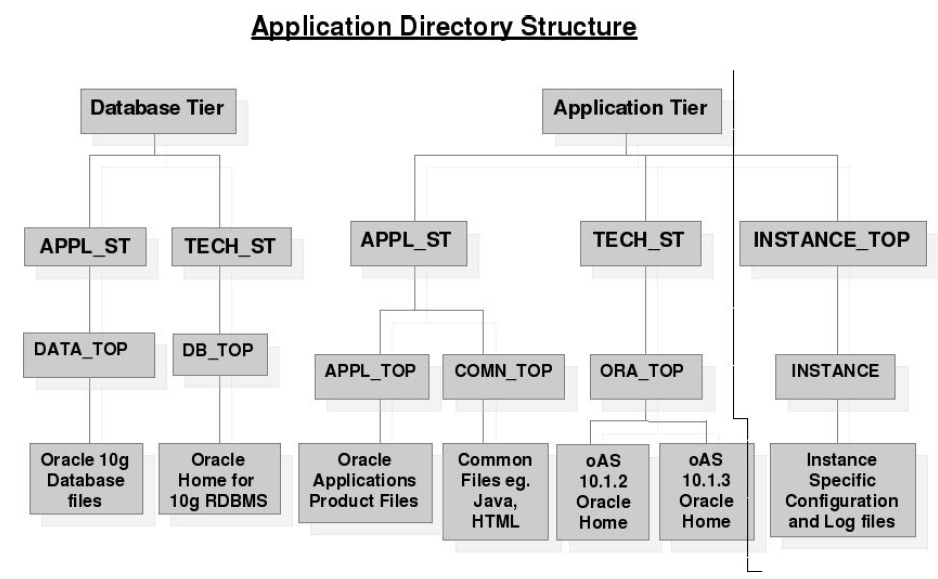
The image shown below describes the complete directory structure for complete e-bs installation i.e. DB_TOP, APPL_TOP and new INST_TOP. If you look into the INST_TOP we will find that it only contains all the configuration files, start-stop scripts, log files, certificate files, pid files etc, so as to make DB_TOP and APPL_TOP untouched for any instance specific changes.


INSTANCE TOP: Instance home is the top-level directory for an Applications Instance which is known as Instance Home and is denoted the environment variable $INST_TOP. This contains all the config files, log files, SSL certificates etc.
Advantages of new INSTANCE HOME:
·         The additional Instance Home makes the middle tier easier to manage and organized since the data is kept separate from the config files.
·         The Instance Home also has the ability to share the Applications and Technology stack code across multiple instances.
·         Another advantage of the Instance Home is that the Autoconfig writes only in INST_TOP so APPL_TOP and ORACLE_HOME can also be made read only file system if required.
·         To create a new instance that shares an existing middle-tier, just create a new instance_top with proper config files and NFS Mount the middle tier in the

INSTANCE TOP – STRUCTURE:
$INST_TOP: $APPS_BASE/inst/apps/$CONTEXT_NAME/
 /admin
    /scripts                                 : ADMIN_SCRIPTS_HOME: Find all AD scripts here
 /appl                                         : APPL_CONFIG_HOME. For standalone envs, this is set to $APPL_TOP
    /fnd/12.0.0/secure           : FND_SECURE: dbc files here
    /admin                                  : All Env Config files here
/certs                                         : SSL Certificates go here
/logs                                           : LOG_HOME: Central log file location. All log files are placed here (except adconfig)
/ora                                            : ORA_CONFIG_HOME
   /10.1.2                                     : 'C' Oracle home config, Contains tnsnames and forms listener servlet config files 
   /10.1.3                                     : Apache & OC4J config home, Apache, OC4J and opmn This is the 'Java' oracle home configuration for OPMN, Apache and OC4J
/pids                                           : Apache/Forms server PID files here
/portal                                       : Apache's DocumentRoot folder


Shared Application Tier File System

We can configure multiple application node machines working with a single E-Business Suite database node. This creation of a “multi-node” E-Business Suite instance is frequently done to lower cost of ownership (many small machines are cheaper than one big one), increase fault tolerance (one machine fails, others do not), or scale the instance (support more users and a greater load).

When configuring Oracle E-Business Suite to use a shared application tier file system, the application tier node can be configured to perform any of the standard application tier services, such as Forms, Web, and Concurrent Processing (Batch).
Note the following definitions:

Node
A node/server/instance is a logical set of processes running on one hardware machine. In a single-node installation of Oracle E-Business Suite, all the Applications processes (including the database processes) run on one node, whereas in a multi-node installation, the processes are distributed across multiple nodes.
A multi-node installation of Release 12 supports both shared and non-shared application tier file systems. An application tier file system consists of:
  • APPL_TOP file system (APPL_TOP and COMMON_TOP directories).
  • Application tier technology stack file system (OracleAS 10.1.2 and 10.1.3 Oracle Homes).
  • Instance Home (INST_TOP) file system. Each application tier has a unique Instance Home file system associated with it.
Service
A service is a functional set of Oracle E-Business Suite application processes running on one or more nodes. Where applicable, the term ’service’ is replacing the more traditional term of ’server’.
Application Tier Services
The following are the major application tier services:
  • Root services
  • Web Entry Point services
  • Web Application services
  • Batch Processing services
  • Other services
So if you have two nodes,one will serve as Primary Node and other will serve as Secondry Node. You can configure both the Application tier node as follows:
Primary Application Tier Node
A primary application tier node is the first application tier node where the APPL_TOP, COMMON_TOP, OracleAS 10.1.2 Oracle Home and OracleAS 10.1.3 Oracle Home are installed and configured.
Secondary Application Tier Node
A secondary application tier node is an application tier node where APPL_TOP, COMMON_TOP, 10.1.2 Oracle Home and 10.1.3 Oracle Home are visible and configured. The APPL_TOP, COMMON_TOP, OracleAS 10.1.2 Oracle Home and OracleAS 10.1.3 Oracle Home file system is mounted to this node from the primary application tier node, or from an NFS server.
Instance Home

Note :  In a shared file system, each application tier will have a unique Instance Home, which should be located on the local file system.

Shared Application Tier File System Architecture
In a shared file system, all application tier files (with the specific exception of the Instance Home file system) are installed on a shared disk resource, which is mounted on each application tier node. Any application tier node can be configured to perform any of the standard application tier services, such as Forms, Web and Concurrent Processing (Batch) services. All changes made to the shared file system are immediately accessible to all application tier nodes.


Shared Application Tier File System Layout
When configuring Oracle E-Business Suite to use a shared application tier file system, an application tier node can be configured to perform any of the standard application tier services, such as Forms, Web, or Concurrent Processing (Batch) services. An application tier will have a unique Instance Home associated with it that cannot be shared with other application tiers. You can configure the services running on an application tier node to match the node’s intended role

Example Shared File System
The following is an example of mount points shared on each application tier node:
  • COMMON_TOP: /ebiz/oracle/VIS/apps/apps_st/comn
  • APPL_TOP: /ebiz/oracle/VIS/apps/apps_st/appl
  • OracleAS 10.1.2 ORACLE_HOME: /ebiz/oracle/VIS/apps/tech_st/10.1.2
  • OracleAS 10.1.3 ORACLE_HOME: /ebiz/oracle/VIS/apps/tech_st/10.1.3
In the figure shown below, entitled “Shared Application Tier File System”, Server-appl_node1 is the primary application tier node, and uses the file systems “/ebiz/oracle/VIS” and “/ebiz/oracle/inst”. The file system “/ebiz/oracle/inst” contains the Instance Home, and “/ ebiz/oracle/VIS ” contains the APPL_TOP, COMMON_TOP, OracleAS 10.1.2 and 10.1.3 Oracle Home.

Server-appl_node2 is the secondary application tier node, and the shared file system “/ebiz/oracle/VIS” is also mounted on this node. The file systems “/ebiz/oracle/inst/apps/VIS_appl_node1″ and “/ebiz/oracle/inst/apps/VIS_appl_node2″ are only visible on the respective nodes.